
Skip to content
FM360AI
Menu

AI request intake

Requests arrive as messages. They should not stay there.

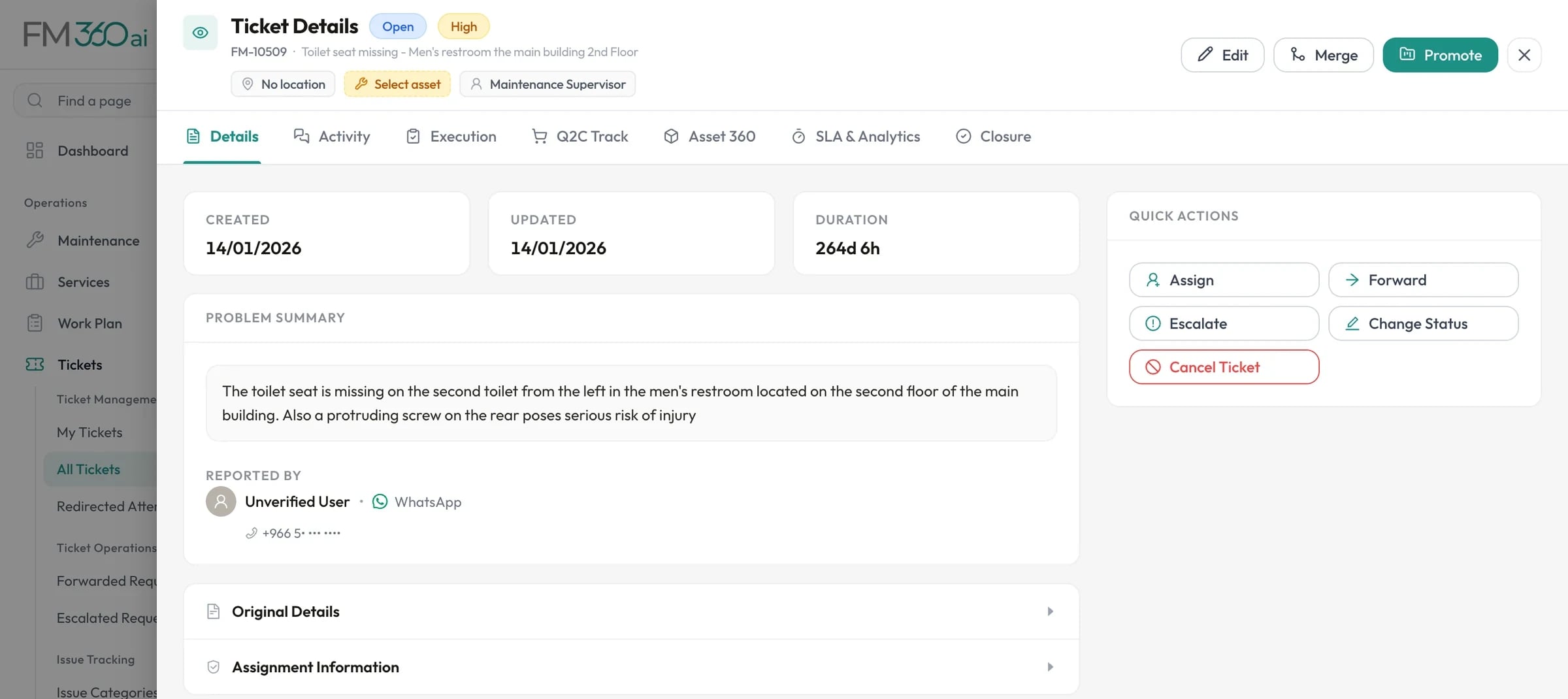
People report problems the way they already talk: a WhatsApp message, an email, a photo with a voice note. FM360AI reads each one and opens a ticket with a title, category, priority and location, then replies with the ticket number.

Ticket details for a request reported by WhatsApp, with the problem summary, reporter, and quick actions to assign, forward, escalate or change status

Swipe the screenshot to see all of it.

Screens are from an FM360AI demo environment. Names and contact details have been replaced.

What the reporter sees

A normal message out, a ticket number back

Nobody learns a form. The conversations below use the wording FM360AI sends today; pick a channel and a time of day to see the reply.

Time of day

FM Helpdeskonline

What FM360AI did with it

  1. 1Matched the sender to your employee directory
  2. 2Read the text and the attached media
  3. 3Chose type, category, priority and area from your lists
  4. 4Opened the ticket with its SLA and an assignee
  5. 5Wrote the reply with the ticket number

On WhatsApp, messages are processed in batches, so the reply follows a few minutes later. Email replies arrive in the same thread.

Illustrated conversations with example names. The replies are the product's own wording.

The problem

A shared inbox is where requests go to be forgotten

When requests live in a WhatsApp group or a mailbox, somebody has to retype each one into a system before anyone is accountable for it. The ones that are not retyped are the ones you hear about again later.

  • A message reporting three problems becomes one vague job, or none.
  • Nobody can say how many requests arrived last week, or how long they waited.
  • After-hours messages about real hazards sit unread until morning.

What FM360AI does

AI request intake, in detail

Classified against your own lists

The model chooses from the categories, sub-categories and areas you have configured, sets a priority, and writes a short title and summary. Photos are described, voice notes and video audio are transcribed, and Arabic messages are understood alongside English.

  • Ticket type: maintenance, service, HSE or other
  • Greetings, thanks and test messages do not create tickets
  • The original message and media stay attached to the ticket
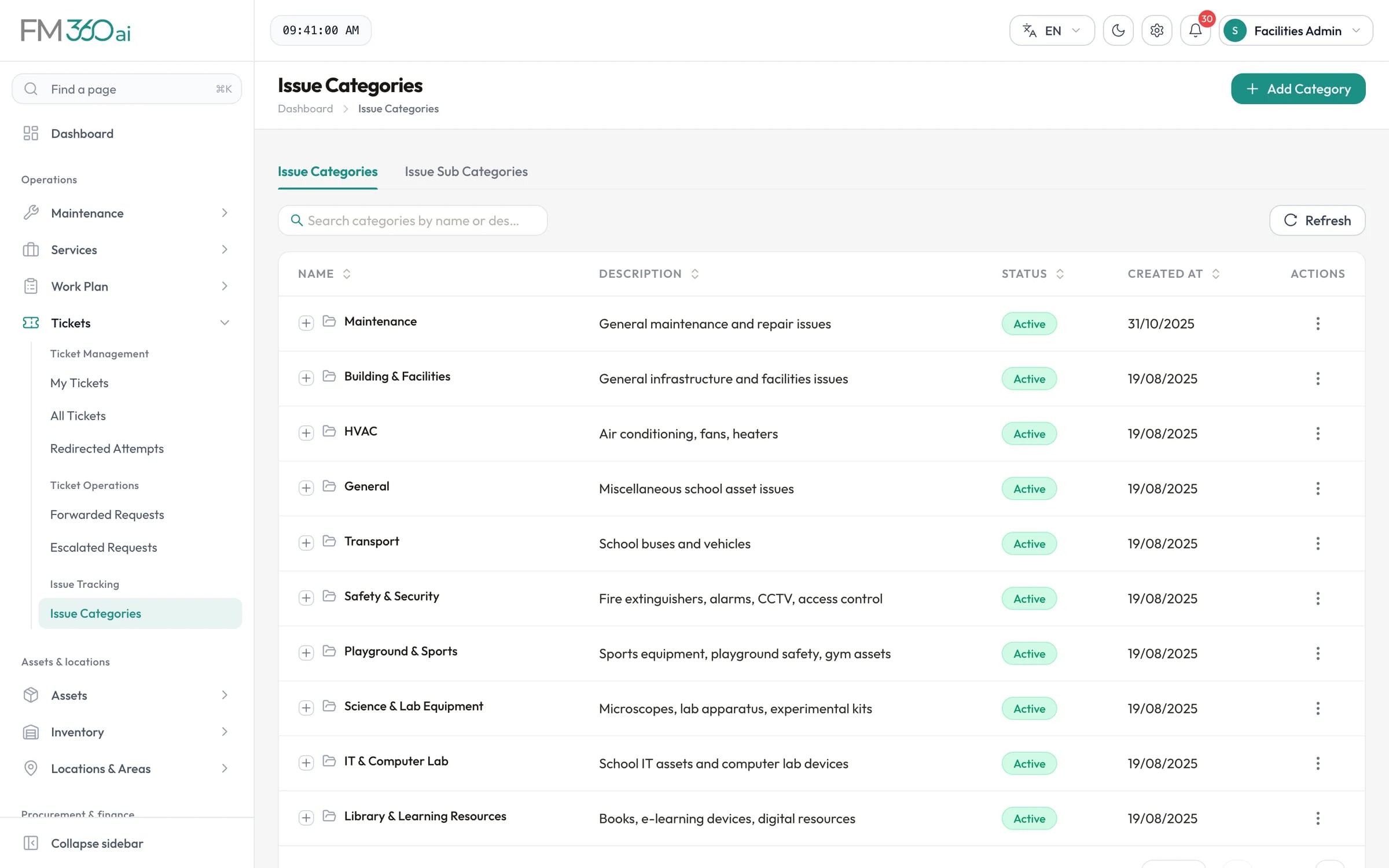
Issue categories list including Maintenance, HVAC, Transport, Safety and Security, and Science and Lab Equipment

Swipe the screenshot to see all of it.
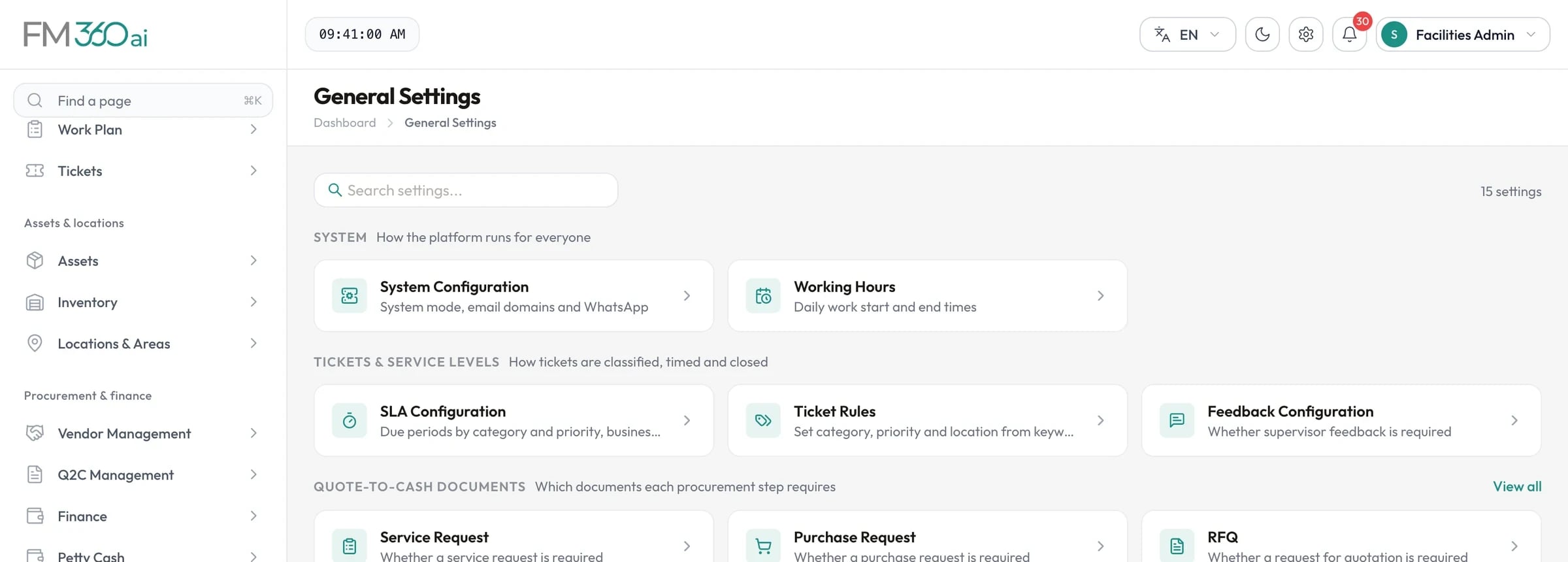
Rules that keep the model on your terms

Ticket rules let an administrator say that certain keywords always mean a given category, priority, ticket type, location or safety flag. When a rule matches an incoming issue, the rule wins over the model's own choice.

General settings catalogue with system configuration, working hours, SLA configuration, ticket rules and procurement document settings

Swipe the screenshot to see all of it.
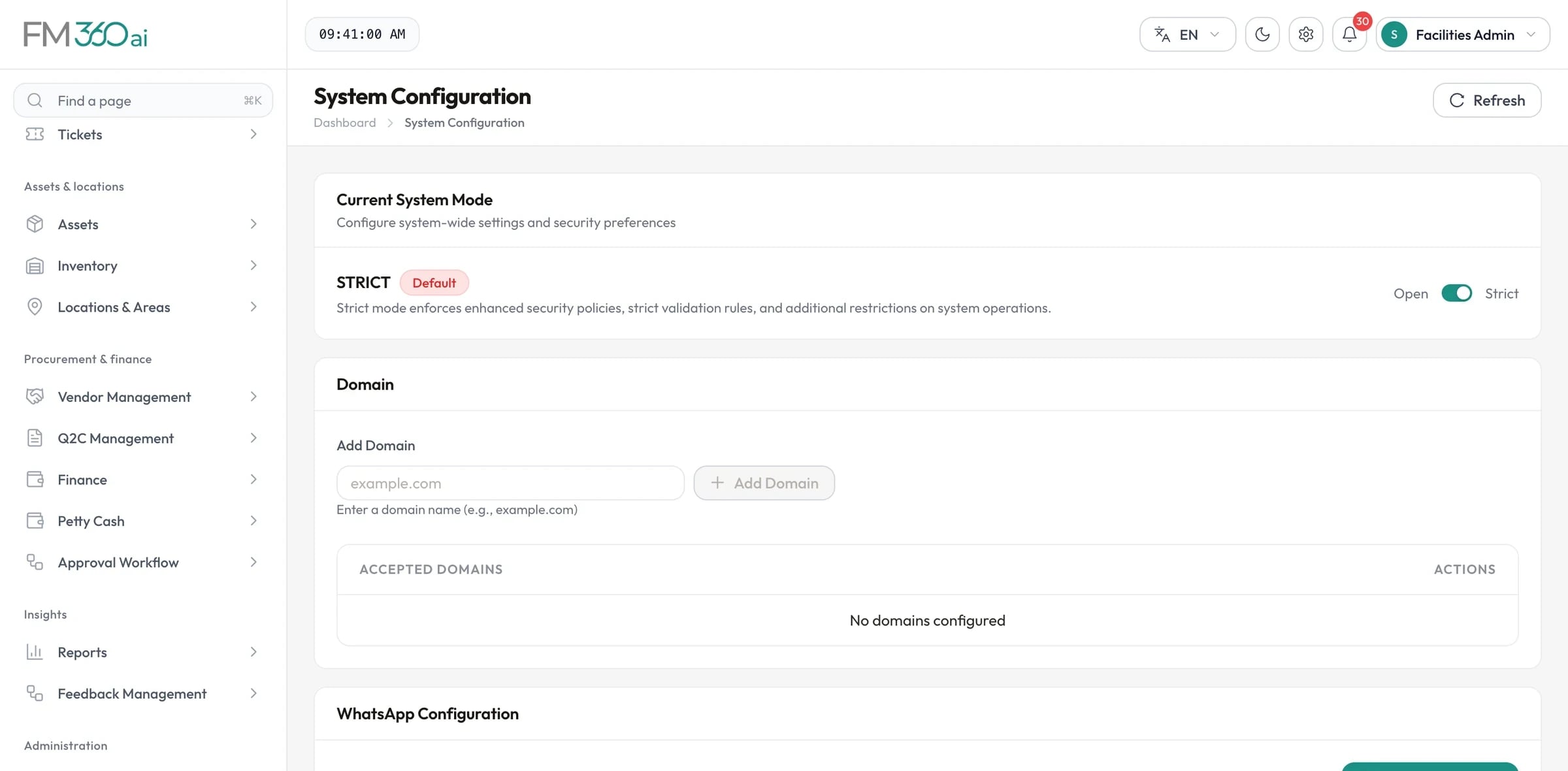
Control who can raise a ticket

In open mode anyone who messages the number can report. In strict mode only recognised employees and approved email domains create tickets; everything else goes to a Redirected Attempts queue where a supervisor can review it and convert it to a ticket.

System configuration with open or strict mode, accepted email domains and WhatsApp configuration

Swipe the screenshot to see all of it.
Three ways in, one ticket queue

Staff send a message to a WhatsApp number your team links to FM360AI, write to a facilities mailbox, or use Quick Report in the mobile app. All three feed the same pipeline and the same ticket list, with the source shown on every ticket.

  • WhatsApp: link a number by scanning a QR code in settings
  • Email: a Microsoft 365 shared mailbox, or any IMAP mailbox
  • Mobile app: text, photos, video and voice notes with a location note

One message, several problems, separate tickets

A message that says the corridor light is out and the tap in the next room is leaking is two jobs for two trades. FM360AI splits it into a parent ticket with one child ticket per issue, so each can be assigned, timed and closed on its own.

Safety reports do not wait for office hours

You set the working hours. Routine messages outside them are held until the next working period. Each message is also assessed for safety risk, and anything rated critical or high is ticketed straight away.

How it works

From message to ticket

What happens after someone presses send.

  1. Step 1

    A message arrives

    Text, photos, video or a voice note by WhatsApp or email, or a Quick Report from the app. Media sent together is grouped into one report.

  2. Step 2

    The sender is checked

    The phone number or email is matched to your employee directory. In strict mode, unknown senders are routed to the review queue.

  3. Step 3

    The content is read

    Images are described, audio is transcribed, and the text is split into individual issues. Non-issues are filtered out.

  4. Step 4

    Tickets are created

    Each issue gets a title, category, priority, area, the matching SLA and an assignee from the responsible team, falling back to the FM manager.

  5. Step 5

    The reporter gets a reply

    An acknowledgement with the ticket number goes back by WhatsApp or as a reply to the email thread.

Who uses it

Staff and occupants
Report a problem in the app they already use, without learning a form.
Helpdesk and supervisors
Stop retyping. Review the queue, correct what needs correcting, and assign.
FM managers
See every request counted, sourced and timed from the moment it arrived.
FM360AI for schools and campuses

Good to know

The scope and limits of this part of the product, so there are no surprises later.

  • WhatsApp works by linking a WhatsApp number to FM360AI through QR pairing, as you would link WhatsApp Web. It is not the WhatsApp Business Platform API, and it does not use message templates or buttons.
  • Intake is one-way: people send a report and receive an acknowledgement. There is no chatbot and no status lookup by message.
  • WhatsApp messages are processed in scheduled batches, so the ticket and its acknowledgement follow a few minutes after the message rather than instantly.
  • Acknowledgements are written in English. Incoming Arabic and English are both understood.
  • Message text and media are processed by a third-party language model: Google Gemini by default, with OpenAI supported as an alternative.

Questions about AI request intake

Do reporters need an account or an app to send a WhatsApp request?

No. They send a normal WhatsApp message to the number your team has linked. If their phone number is in your employee directory the ticket is recorded against them; if not, what happens depends on whether you run in open or strict mode.

What does the AI decide, and can we override it?

It decides whether the message is a real issue, splits it into separate issues, and picks the ticket type, category, sub-category, priority and area from your own configured lists. Ticket rules override the model for the keywords you define, and a supervisor can edit any ticket afterwards.

Does it understand photos and voice notes?

Yes. Photos are analysed and described, voice notes are transcribed, and for video both sampled frames and the audio track are used. The result goes through the same classification as typed text.

What happens to a message that is not a maintenance issue?

Greetings, thank-yous, casual chat and test messages are filtered out and no ticket is created. If the content is unclear, a ticket is created so that a manager can review it rather than risk losing a real report.

Which email systems can it read?

A Microsoft 365 shared mailbox through Microsoft Graph, or any mailbox that supports IMAP. Attachments and inline images are kept with the ticket, and the acknowledgement is sent as a reply in the same thread.

See FM360AI with your own buildings in mind

Tell us how requests reach your team today and what you maintain. We will walk you through the product on a call, using the workflows that matter to you.

  • A walkthrough of the real product, not slides
  • Time for your questions about fit and limits
  • No obligation to continue